


Salesforce Scheduled Flows are a practical and powerful solution for automating processes that need periodic execution.
However, when configuring a direct date filter—such as fetching records created “today”—we encounter a limitation: the Start element does not support record filters that reference resources or flow elements directly.
This restriction prevents us from using dynamic filters like CreatedDate = TODAY(), requiring alternative strategies to achieve the desired outcome without exceeding organizational limits.
In this post, we’ll explore the problem in detail, present an alternative solution using formula fields, discuss its pros and cons, and evaluate the best way to implement this approach without compromising system performance.
1. The Problem with Direct Filtering in Scheduled Flows
When creating a Scheduled Flow to fetch records from a specific object, such as Account, setting the CreatedDate field equal to TODAY() seems intuitive.
However, upon configuring this condition in the Start element, Salesforce returns an error message:
“The Start element can’t have a record filter condition that references a resource or element.”
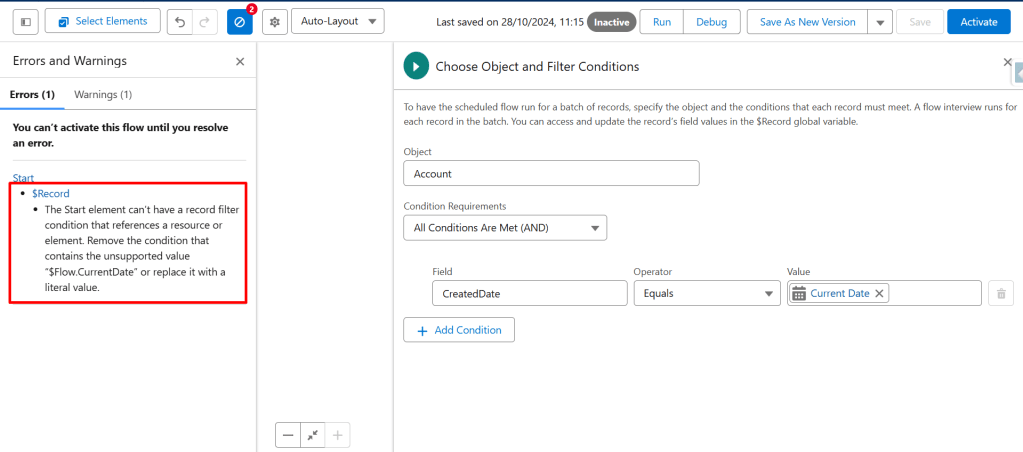
This limitation prevents the use of dynamic dates or flow variables ($Flow.CurrentDate) as start condition filters. Without this option, a common workaround is:
- Fetching all records of the object into the flow.
- Using a Decision element to apply the creation date filter.
While this method works, it comes with a risk: processing limits. Salesforce enforces restrictions on the number of scheduled flow executions per day. The limit is 250,000 scheduled flow interviews daily or the number of user licenses multiplied by 200, whichever is greater. Loading all accounts in an organization daily can quickly consume this limit and impact system performance.
2. Alternative Solution: Using a Formula Field
To work around this limitation, a viable strategy is to create a formula field of type checkbox on the Account object, which returns true (true) when the record’s creation date is equal to the current day.
This way, the Scheduled Flow can filter only records where the formula field is marked as true, avoiding the need to load all records and ensuring that only accounts created today are processed.
Implementing the Formula Field
- Create a formula field on the Account object with a “Checkbox” return type.
- Set the formula as follows:
DATEVALUE(CreatedDate) = TODAY()
This will make the field return true for records created on the current day. - In the Filter Condition of your Scheduled Flow, add a condition to filter records where this formula field is equal to “true.”

With this setup, the flow will only execute for records created today, conserving processing power and avoiding the unnecessary load of records.
3. Pros and Cons of Using Formula Fields
Although this solution effectively bypasses the initial limitation, using formula fields can introduce some challenges and disadvantages that need to be considered:
Advantages
- Processing Efficiency: Loading only relevant records avoids excessive resource consumption and reduces the risk of hitting the daily execution limits of scheduled flows.
- Flow Simplification: With the filter applied directly at the start, the flow is simplified, without needing additional decisions to filter records.
Disadvantages
- Formula Field Limitations: Objects can end up cluttered with formula fields, especially if the need for specific filters increases. This can result in a visually cluttered object that is more challenging to manage.
- Performance Impact: Too many formula fields on an object can impact system performance since they are recalculated whenever accessed.
- Maintenance Complexity: Over time, managing multiple formula fields can become challenging, especially in objects used in various flows and processes.
Final Considerations
The solution of creating a formula field on the Account object to filter records based on the creation date is an excellent example of a workaround for limitations in Salesforce scheduled flows.
It’s an approach that balances the need for processing efficiency with configuration simplicity, avoiding the risk of exceeding execution limits. However, it should be implemented carefully, considering potential long-term performance and maintenance drawbacks.
In summary, using a formula field is a practical and effective approach, but always with the caution of not overdoing it, keeping the environment organized and functional for future expansions.
COMMENTS:
 posts
posts 
Leave a comment